
Approve a model change without reading its JSON
Pywr for Azure DevOps shows each pull request that changes a Pywr model as added, changed and removed components, and on the schematic. Reviewers comment and vote in the browser, without Git and with nothing to install.
For Azure DevOps Services, with Pywr v2 and Pywr v1 models. How the licence works.
Every model review in one list
The Model reviews page under Repos lists the pull requests of every repository in the project that change a Pywr model, with what each one adds, changes and removes.
- List the ones assigned to you, the ones you created or all the active ones
- See your decision on each, and narrow the list to one repository
- Put the reviews waiting for you on a dashboard with a widget

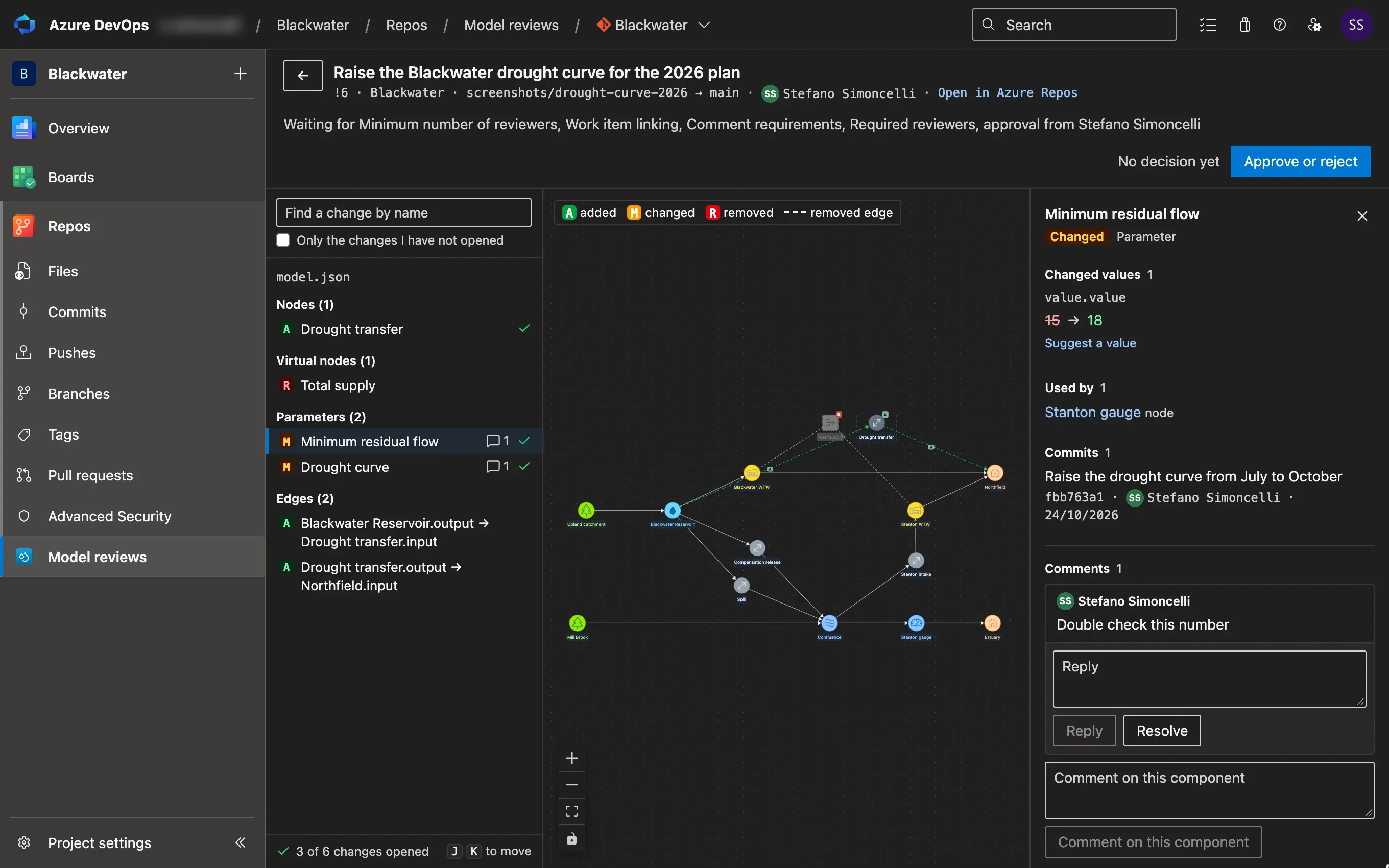
Each value before and after the change
Pick a component to see each value it changes, in the target branch and in the pull request, the components that use it and the comments on it.
- Changes are grouped by model file and by type of component
- A dot marks the changes you have opened, on any computer
- Long values, such as a list of control curves, open side by side

See the problems a change adds
Each model the pull request changes is checked. The problems it adds are listed above the changes, and the ones the target branch already has are left out.
- A parameter used by a node but missing from the model
- Two components with the same name
- The changes with a problem carry a warning in the list

Comment, suggest a value, then decide
Comment on a component, or propose another value for the author to apply. Your decision is your vote in Azure DevOps, so the branch policies apply as usual.
- Comments are attached to the lines of the model file
- Before you save, you are warned about the changes you have not opened
- Post a summary of the changes for the people who read the pull request by email

Compare any two versions
Compare two branches, tags or commits of a repository, such as last year's plan and the main model, in the same three panes as a pull request.
- Every difference between the two, as changed components
- Browse a model without a pull request from the Preview tab of Azure Repos

Try it for 30 days, then pay by the year
The licence belongs to the organisation, so there is no key to enter and nothing to set up for each reviewer.
- The trial
- Each organisation can use the extension free for 30 days from the first time anyone opens it.
- The price
- A yearly licence for the whole organisation, priced by the number of seats. Email support@pywrtools.dev for the prices or a demo.
- Seats
- Each user who opens the extension takes a seat. A seat is freed when its user has not opened the extension for 30 days.
- Paying
- Select Buy a licence on the Model reviews page to pay by card. To pay by invoice, quote the organisation ID shown next to it on your purchase order.
Help setting up Azure DevOps
We can help you set up the rest of Azure DevOps for your models, such as the pipelines and the branch policies.
The changes come from VS Code
Modellers make the changes in Pywr for VS Code, a free extension, and open the pull request from there. Comments are attached to the lines of the model file, so a question asked in Azure DevOps is answered in the editor, and the answer is back in the review. Reviewers do not need VS Code.
How a change is approvedInstall it for your organisation
- An administrator installs Pywr for Azure DevOps from the Marketplace, once for the whole organisation.
- Set the branch policies of the main model, so that a change reaches it only once it is approved.
- Send the reviewers to Model reviews under Repos. They need no personal access token: the extension reads the files with their own permissions.
Works with Azure DevOps Services, the cloud version of Azure DevOps, and with Pywr v2 and Pywr v1 models.